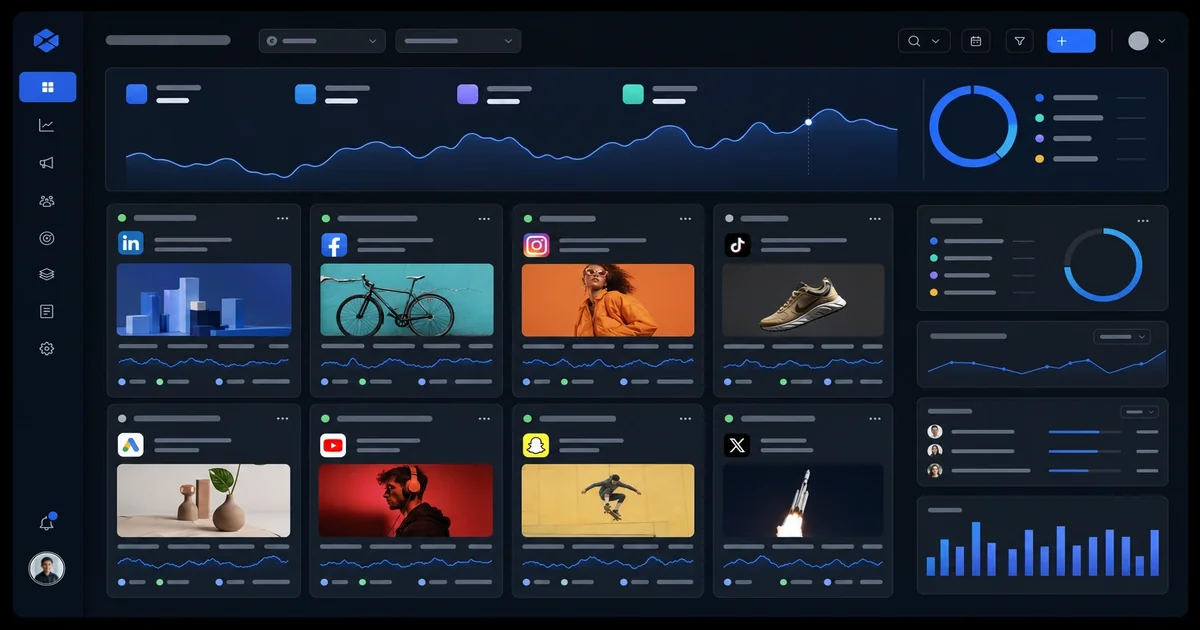
ads.decisionsciencecorp.com: internal ads ops hub
Managing advertising campaigns for clients was becoming a mess. We had Google Ads in one dashboard, Meta in another, creative assets scattered across drives, and no single place to see how everything performed together. Every week felt like forensic work — piecing together data from multiple platforms just to answer basic questions about what was working.
That's when we realized we needed our own ads operations hub. Not a replacement for Google Ads or Meta Business Manager, but a layer on top that gave us the unified view and workflow we needed. That's what ads.decisionsciencecorp.com became — our internal command center for everything advertising.
Why Separate Ads Tooling
The obvious question is why build something when platforms like Google and Meta already provide dashboards. The answer is that those dashboards are designed for single-platform management. They don't talk to each other. They don't show you cross-channel performance. They don't give you a single source of truth for your client reporting.
Here's what we found missing from platform-native tools:
- No unified view across Google and Meta campaigns. We'd have to manually combine data to see the full picture. - No central place for creative assets. Images and videos lived in drive folders, shared folders, random Slack links — impossible to find what we'd used before. - No consistent reporting structure. Every client got something different, depending on who prepared it and what time they had. - No testing documentation. We'd test ad creative, but we'd lose track of what we'd tried and what worked.
This isn't a platform problem — it's a multi-platform problem. When you're running campaigns across Google, Meta, and emerging channels, you need a layer that pulls everything together. That's what the hub provides.
What the Hub Does
The ads ops hub is our internal application that serves four functions:
Unified campaign overview. We pull data from Google Ads and Meta through their APIs and display performance side by side. Every client campaign shows spend, impressions, clicks, conversions, and cost per conversion in one view. We're not doing any fancy math — we're just putting everything in one place.
Creative asset management. Every creative asset we use — images, videos, copy variations — gets uploaded to the hub with tags for platform (Google/Meta), ad format (feed/story/reel), and campaign. When we need to reuse something, we search the hub instead of searching drives.
Testing documentation. Each test we run gets logged with its hypothesis, creative variants, audience, and result. This is probably the most valuable part — we can look back at what we tested, why, and what happened. That institutional knowledge used to live in Slack threads. Now it lives in the hub.
Client reporting. We generate weekly and monthly reports directly from the hub. No more manually combining spreadsheets. The data flows from the platform APIs into our reporting templates, and we export or share directly.
Architecture Overview
The hub lives on our internal infrastructure — same as everything else. We built it with a straightforward stack:
- A PHP backend that pulls data from Google Ads and Meta APIs on schedule - A simple database storing campaign metadata, creative assets, and test records - A web interface for navigating and managing everything
The key piece is the API integrations. We authenticate with both platforms using OAuth, store tokens securely, and pull data on a schedule. This is all automated — no manual exports.
Here's the critical part: we don't modify anything in the platform dashboards from the hub. We're read-only. The hub shows data, but all campaign management happens in Google Ads and Meta Business Manager. This keeps everything in sync and avoids the complexity of bi-directional sync.
How We Built It
We built the hub in layers, which is how we'd recommend anyone tackle this:
Layer one — data pulling. The first thing we did was get data from Google Ads into our database. We built a simple scheduler that pulls performance data every six hours and stores it. That's what the hub was initially — a Google Ads viewer. We added Meta after, using their Marketing API.
Layer two — creative storage. After we had data, we added the creative management layer. Every asset we upload gets stored with metadata: platform, format, campaign type, and usagedates. That's searchable and reusable.
Layer three — testing framework. We built a simple test logging system. Each test gets a record: name, hypothesis, variants, audience, duration, and result. That's always manually updated, but it's worth it.
Layer four — reporting. The final layer was automated reporting. We built templates for weekly and monthly reports, populated with data from the API pulls.
That's been our progression over several months. We didn't build everything at once — we built what we needed at each stage.
What It Replaced
Before the hub, here's what our workflow looked like:
- Log into Google Ads, export performance to spreadsheet - Log into Meta, export performance to spreadsheet - Combine spreadsheets manually, try to align date ranges - Search drives for creative assets, hope they were named correctly - Search Slack threads for test results, hope they existed
That's maybe thirty minutes per client per week. That adds up. And that's before any analysis.
After the hub:
- Log into hub, see all performance in one view - Search creative in hub, find assets instantly - Reference test results in hub, see what worked before
That's maybe five minutes per client per week. The difference is significant, and it keeps growing as we add more clients.
Integration With Other Tools
The hub fits within our broader infrastructure:
- It's connected to our CRM via shared customer records. When we see a conversion in Google Ads, we can tie it back to our CRM to see the full customer journey. - It's connected to our billing. We track ad spend per client and tie it to our invoicing. - It's connected to our reporting. Weekly client reports come directly from the hub.
This integration didn't exist when we first built the hub — it grew organically as we added connections. That's the right approach: build the core first, connect later.
What We'd Do Differently
Our biggest regret with the hub is not building it sooner. The data consolidation alone justified the development time. Here are the other things we'd change:
- Better test logging from the start. We didn't formalize testing documentation until six months in, and we've lost some institutional knowledge from that period. - More automated data pulls. We pull every six hours now, but we'd pull hourly if we could. The more real-time, the better. - Client-facing portal. Some clients have asked for direct access to their hub data. We haven't built that yet, but it's on the roadmap.
Close
The ads ops hub isn't a replacement for platform tools — it's a layer on top that makes multi-platform advertising manageable. Every client we manage benefits from consolidated data, searchable creative, and consistent reporting.
If you're running campaigns across multiple platforms and you're still combining data manually, that's your sign. Build your hub — even a simple version will pay for itself in time saved.
This is one of those internal tools that we'd open-source if there was demand. The core pattern — pull from platform APIs, store in one place, expose through a simple UI — translates to any multi-platform advertising operation. It's not our priority right now, but it's something we'd consider if there's community interest.
We run this in production every day. If you want the same capability for your program, or help turning ops data into a clear decision, get in touch.