Orderboard: the ghost-kitchen pickup display we open-sourced
The public repo is called Orderboard, but the product name on the tin is Ghost Kitchen Order Board. If you read an older draft of this post and pictured a kanban tool for consulting invoices, delete that mental model. Orderboard has nothing to do with invoicing, ERPs, or service-delivery pipelines.
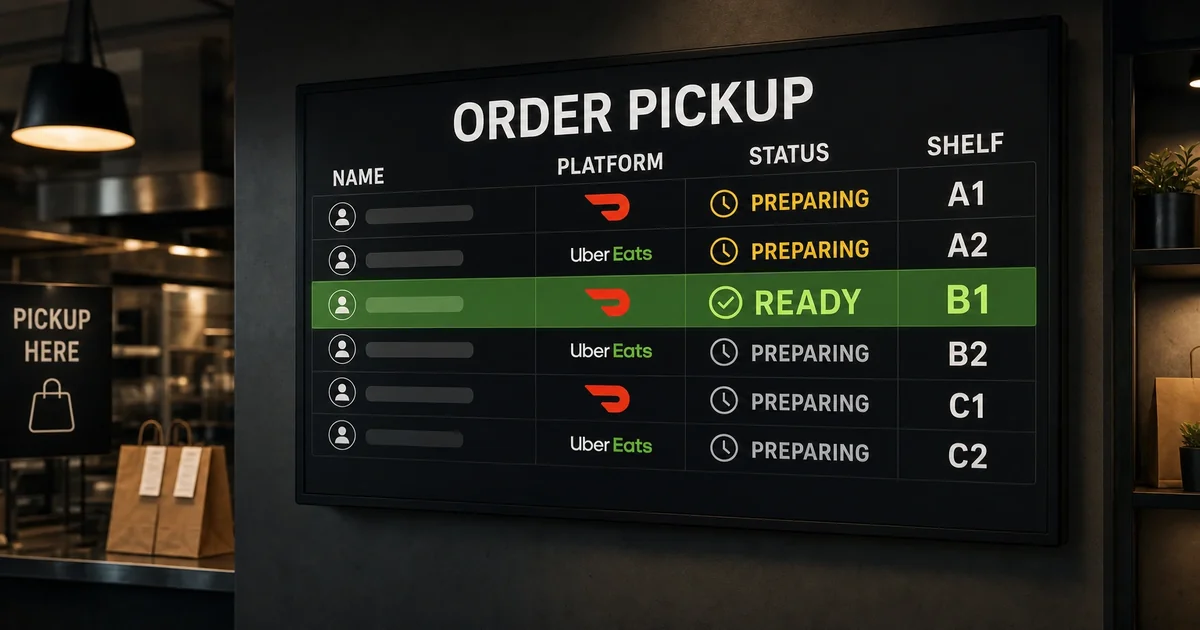
It exists for one job: when a DoorDash, Uber Eats, or Grubhub courier walks into a ghost kitchen, they need to see — from across the room — whose bag is ready and which shelf it is on. That is a physical operations problem, not a SaaS backlog problem.
The problem we actually had
Delivery-only kitchens do not have a front counter where drivers queue politely. Orders arrive on three different tablets, names get truncated, two drivers show up for “Alex,” and the person on expo is shouting over a hood fan. Industry pattern (Wingstop, Five Guys, Chipotle-style pickup walls) is a large display: customer name, platform logo, status, shelf letter. Readable at eight to ten feet. No scrolling. READY rows visually dominant.
We built Orderboard while running real ghost-kitchen volume — including our own field lab, Empanada Empire in Richardson, TX. The board is the source of truth for “bagged, sealed, on shelf B,” separate from Kitchen POS, separate from marketplace tablets, separate from Sanctum Tasks. Light weight on purpose: PHP, SQLite, nginx-friendly public/ docroot, same multihost pattern we use elsewhere at Decision Science Corp.
What ships in the repo
The open-source project lives at decisionsciencecorp/orderboard on GitHub. Day-one scope from the README and codebase:
- Driver display (
/display/) — full-screen board, auto-refresh, columns for name, platform, status, shelf. Dark theme tuned for wall mounts. - Admin panel (
/admin/) — Bootstrap UI to create orders, markpreparingvsready, assign shelf letters A–F, remove when picked up. - REST API — CRUD plus a public
/api/display.phpfeed for the wall UI. API-key auth on mutating routes. - Python SDK (
orderboard_sdk/) — zero-dependency client for scripts and automations. - SMCP plugin (
smcp_plugin/) — MCP-shaped tools so agents can maintain the board. The bundled agent persona is Mack, “Order Board Runner”: create orders, mark ready with a shelf, delete on pickup — and stop to ask if anything is ambiguous.
Platforms are first-class in the schema: doordash, ubereats, grubhub, with logos on the display row. Status model is intentionally narrow — preparing and ready only — because anything else becomes arguable on a busy Friday night.
How the workflow is supposed to feel
Expo hears a name, bags the order, seals it, hits ready, assigns shelf B. The wall shows TIMMY R · DoorDash · READY · B in type large enough that the driver does not need to squint at a phone. When the bag leaves, the row disappears. No drag-and-drop columns. No “client amount” field. No three-column kanban for professional services.
If you are integrating programmatically, the happy path is boring on purpose:
curl -X POST …/api/create-order.php \
  -H "X-API-Key: …" \
  -d '{"customer_name":"John Doe","platform":"doordash"}'

curl -X POST …/api/update-order.php \
  -d '{"order_id":"ORD-…","status":"ready","shelf_location":"B"}'
The Python SDK mirrors the same calls; the SMCP plugin exposes them to agents with explicit job rules (do not guess shelf letters, READY means bagged and sealed, one order / one shelf).
Why we open-sourced it
Other ghost kitchens have the same pickup-wall problem. The code is small enough to audit (SQLite schema, a handful of PHP endpoints, Playwright + PHPUnit tests in-tree). License is dual: AGPLv3 for code, CC-BY-SA 4.0 for documentation — not a proprietary “contact sales” SKU, but also not a mislabeled BSD drop.
Orderboard sits in the same toolbox as our other Sanctum-era infrastructure posts: software we run in production, then publish so self-hosters can steal the pattern. It complements Kitchen POS and marketplace research posts; it does not replace them.
If you want to run it
Clone the repo, point nginx at public/, ensure db/ and logs/ are writable, change the default admin password, issue an API key, mount a tablet or TV on /display/. Full API reference is in docs/api-documentation.md.
If you are operating a delivery-only brand and want help wiring the board to your agents, POS, or multihost stack, contact us here. If you just need the wall, the repo is the spec — built for drivers, not for invoice workflows.